
Muse v3.5: You Asked. We Built It.
🎨 Muse v3.5: You Asked. We Built It. Tape Tool, Stroke Eraser, board & PDF search, lifetime subscriptions, and so much more.
- "You're the Muse of Muse" interview opportunity. Sign up to be interviewed and help shape where Muse goes next.
- Download Allume for Mac, iPad & iPhone

Hello Muse Community,
It's been a busy stretch since the Dark Mode release back in May. In those few months I've shipped ten more updates to Muse, nearly one every three weeks, and every single one was guided by you: your bug reports, your feature requests, your encouragement in the community, and the conversations we've had in the "Muse of Muse" interviews. I want to take a moment to look back at everything that's landed, celebrate what your feedback has made possible, and share what I'm most excited about in this latest build.
There's a lot to cover, so let's dig in.
The Tape Tool 🎞
This one is genuinely new. The Tape Tool draws textured tape strips right onto your canvas, the kind you might tear off a roll and press over your notes on a real desk. But here's what makes it special: tap a strip, and it reveals what's hidden underneath.
That one little interaction, hide and then reveal, opens up a whole new way to work in Muse. Teachers can prepare a board full of questions with the answers covered in tape, then uncover them one at a time during a lesson. Students can quiz themselves on their own boards like interactive flashcards. And anyone thinking through a problem can use tape to set an idea aside without deleting it, then peel it back when the moment is right. It's the kind of thing that makes the canvas feel physical in a way software so rarely does.
The Tape Tool is available today to Backstage Pass subscribers. If you haven't heard of Backstage Pass yet, it's an early access program that lets you try new tools while they're still being built, and gives you a direct say in how they turn out. Learn more when you open Muse settings.
Stroke Eraser ✏️
This one has been on the list for a long time, and I'm glad it's finally here. The standard eraser clips strokes. Drag through a line and it cuts out whatever the eraser touched, leaving two shorter lines where one used to be. It works, but it's not how most of us think about erasing. You drew a stroke; you want to erase that stroke.
The new Stroke Eraser mode does exactly that: touch any part of a stroke and the whole thing disappears instantly. It's faster, it's cleaner, and it just feels right. If you draw and sketch in Muse regularly, I think this is the kind of small fix that makes the app feel like it finally gets how you work. Stroke Eraser is a Backstage Pass feature too.
Find Anything in Muse 🔍
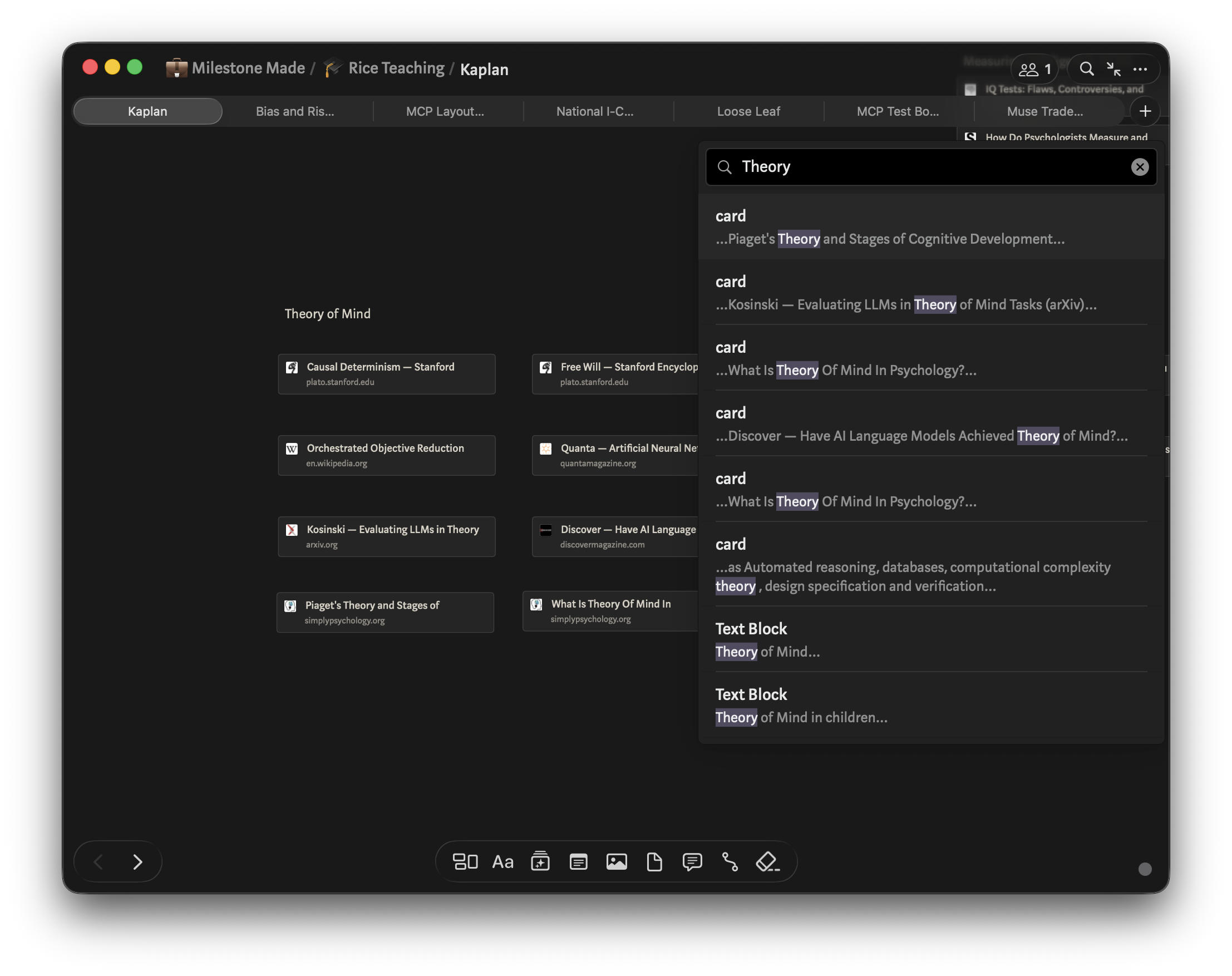
A theme running through these recent releases has been making your boards searchable in ways they simply weren't before. With v3.5, three of those features landed together, and together they make a real difference.
Board Search lets you search for text across every card on a board, with the matches highlighted right on the canvas so you can see exactly where your term shows up. Use the keyboard (or just tap) to jump between results. It works the way you'd expect find-in-page to work, only now it's for your whole spatial canvas.
PDF Search brings that same experience inside your PDFs. Find any word or phrase in a document, with highlighted results and easy navigation. And for the first time, you can now select and copy text straight out of PDFs in Muse: long press on iPad, or hold the Command key on Mac, to grab text from any document.
If you're a researcher or a student, or you simply keep important PDFs on your boards, this trio of changes makes Muse a far more capable place to do your research.
More Good Things 🌟
A lot more has shipped since May, and I don't want any of it to get lost in the footnotes:
- 📺 Paste a YouTube URL and Muse automatically imports the video thumbnail as an image card alongside the link
- ▶️ Videos can now be scrubbed while playing or paused; drag the playback position to jump anywhere
- 🖼 PDFs and images now support pinch-to-zoom for detailed viewing
- 📐 On Mac, hold Shift while drawing to create perfectly straight lines
- 🎞 Animated GIFs now have a play/pause button, with full accessibility support and respect for the system Auto-play Animated Images setting
- 🗂 Workspaces can now be sorted on iPad, with your sort order saved between sessions
- 🌏 Simplified Chinese translation added, joining French, German, and Spanish
- ♿ Board zoom now adapts to your system accessibility text size settings for improved readability
- 📋 A Recent Updates modal shows what's new each time Muse updates, so you never miss a change
- 🎯 On Mac, "Zoom to 100%" now zooms to fit your current selection when one is active
- 💬 Hovering over a card title that's too long to display now shows a tooltip with the full title (Mac)
More Ways to Make Muse Yours 🔑
One thing I've heard again and again is that people want more flexibility in how they subscribe to Muse. So I've been working to expand those options, and I want to make sure you know what's available.
Lifetime subscriptions are now available for anyone who'd rather make a one-time purchase than pay a recurring plan. You'll find all the details, pricing included, in the FAQ section inside Muse settings, or just reach out by email and I'll help you get set up.
Education pricing is still here for students and teachers, and it's easier to get now. Instead of working through an in-app purchase flow, you'll see a direct email prompt when you tap the education option. Send me a note and I'll get you sorted.
Setapp is still a great option if you're already a subscriber, with Muse included in the library at no extra cost. And of course, Muse is available directly through the App Store on any Apple device.
Looking Ahead 🚀
The "Muse of Muse" interviews have been one of the best things I've done as a solo developer. Sitting down with people who use Muse every day, hearing what they're working on, where the app helps, and where it still gets in the way, has shaped what I've built over these past nine months more than anything else. Every feature in this post has a thread that leads right back to something a community member told me.
If you'd like to be a part of that, sign up for an interview. Your story matters, and I genuinely want to hear it.
Thank you for using Muse, for sticking with it through all these updates, and for sharing it with the people in your life who might benefit from a quieter, deeper kind of thinking tool. It means everything to me.
❤️ Adam
FAQ
- What is Backstage Pass? Backstage Pass is an early access program for Muse subscribers who want to try new tools as they're being developed and help shape how they evolve. The Tape Tool and Stroke Eraser are both Backstage Pass features in their current form. You can enable Backstage Pass in Muse settings.
- When will the Tape Tool and Stroke Eraser be available to everyone? The plan is to graduate Backstage Pass tools to the full app once they've been refined with community feedback. Joining Backstage Pass is the best way to influence how and when that happens.
- How do I use the Tape Tool? Select the Tape Tool from the drawing toolbar, then draw across your canvas to place a tape strip. Tap any strip to toggle between hidden and revealed. Content underneath is preserved; the tape just covers it.
- How do I switch to Stroke Eraser mode? Long press the eraser tool in the toolbar to see the eraser mode options, then select Stroke Eraser.
- How do I search within a board? On iPad and iPhone, tap the search icon in the toolbar. On Mac, use Cmd+Option+F. Results are highlighted on the canvas and you can navigate between them with the arrow keys or by tapping.
- How do lifetime subscriptions work? Lifetime subscriptions are a one-time purchase that gives you full access to Muse without a recurring fee. Details and pricing are in the FAQ section inside Muse settings, or email hello@allume.com to get set up directly.
- How do I get the education discount? Tap the education option in the Muse subscription flow and follow the email prompt, or email hello@allume.com directly. We'll get you set up with 50% off.
Join the discussion in our community to share how you're using these new tools.
Download Allume
Get Allume on the App Store or Setapp, then share your feedback in our community or via hello@allume.com.